What to take away
- Remote support is a powerful access path that needs clear ownership, permissions and monitoring.
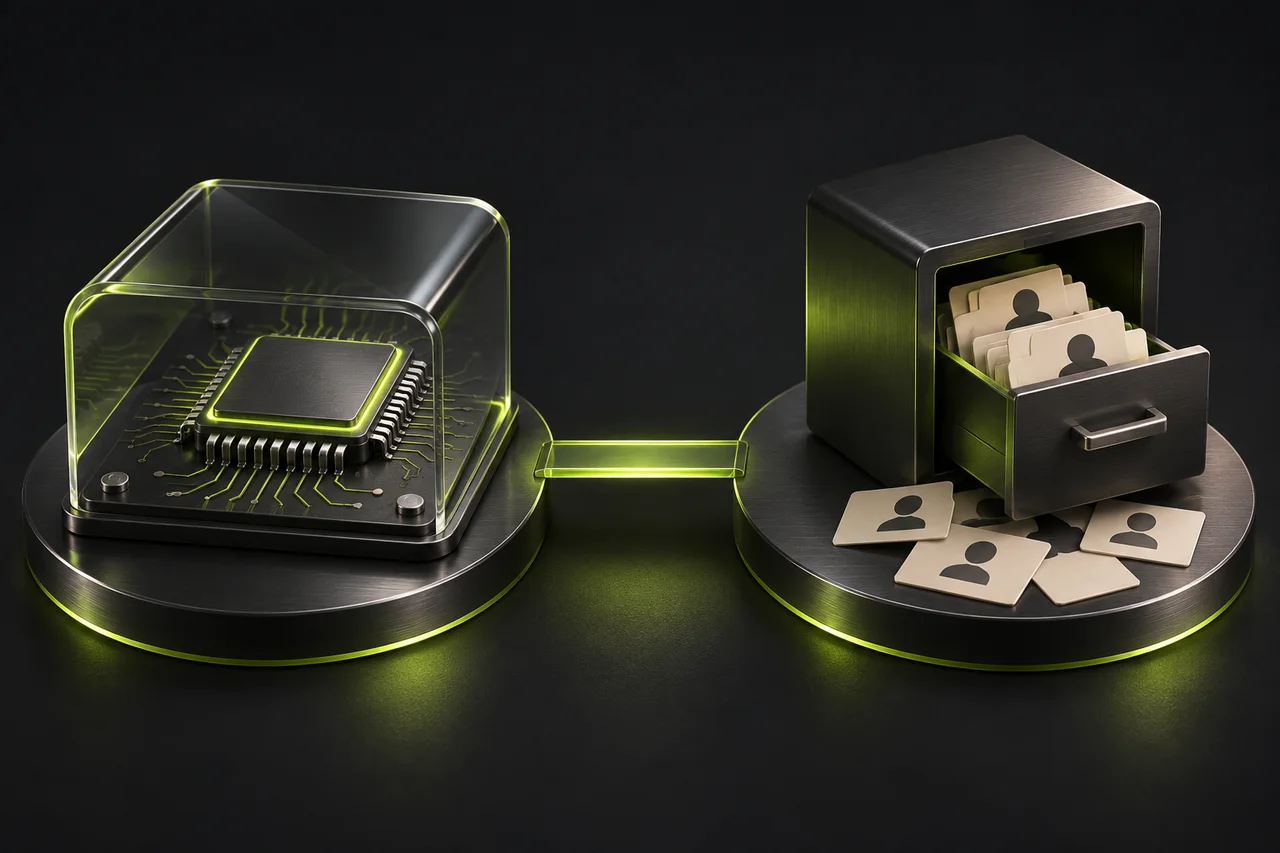
- An extension, the hosting server and a technician’s own client can introduce different risks.
- Installing a fix does not establish that an already compromised environment is clean.
A trusted tool can become an unexpected access path
ConnectWise disclosed unauthorized access to ScreenConnect partner environments on 11 November 2026. Its subsequent guidance addressed abuse of independently developed extensions, unauthorized remote-access software and a separate technician-client risk. The 16 November update said its investigation was complete but protective action remained necessary. Approximately 400 environments had identified extensions installed; that figure was not a count of confirmed compromises. ConnectWise also said its initial investigation had found no evidence of compromised company infrastructure or a ScreenConnect vulnerability providing initial access. [1]
That is a more specific story than “every ScreenConnect customer was hacked.” It involves different layers of a remote-support environment, and the distinction affects what defenders need to examine. This article concerns the November ScreenConnect campaign, not the separate Cloud Backup incident appearing on the same vendor advisory page. [1]
The business question extends beyond one product. When somebody can administer your computers remotely, what else determines whether that access is legitimate? A familiar product name on an installed application does not answer who controls the account, which extensions are enabled, what the technician can do or whether the session relates to an approved support request.
Small businesses often outsource IT precisely because they cannot review every technical decision themselves. That makes clear access arrangements more important, not less. You do not need to become an expert in remote-management software to ask your supplier which people can reach your systems, how their permissions are limited and what evidence would show unusual activity.
Understand the different layers before choosing a fix
Think of remote support as a chain with several separately managed components. There is the service or server that coordinates connections. There are integrations and extensions that add features. There are the accounts used by technicians. There are clients installed on technician devices and customer endpoints. Finally, there are permissions inside the operating systems and applications being administered. An assurance about one layer should not be treated as an assurance about all the others.
This matters when a supplier says, “We updated the server.” That may be necessary, but it does not automatically tell you whether a technician’s device has the required client update, whether an extension remains active or whether an attacker previously created another access route. Ask what the change addresses and which component it covers. A precise answer is more useful than a general statement that everything is patched.
The vendor’s November guidance specifically warns that disabling extensions and updating software do not remove access or persistence already established on affected devices. That is why prevention, containment and recovery must remain separate questions. [1] A technical fix may close the route used to enter while leaving behind a new administrator, a second remote tool or an exposed credential that needs independent investigation.
For a business owner, the practical response is to request a short component-level status report. Ask what was checked, what evidence was available, what actions were completed and what remains uncertain. This avoids both false reassurance and unnecessary panic. A vendor advisory can tell you what to examine; only evidence from your actual environment can establish what happened there.
A small agency’s remote-support boundary
Consider a hypothetical digital agency in Cebu with fifteen staff and an external IT provider. The provider manages laptops, email accounts and a server holding customer exports. Staff know that support sometimes connects remotely, but there is no written list of authorized technicians. An old contractor still has a login, and nobody has agreed whether unattended access is allowed outside working hours.
Nothing in that scenario proves a compromise. It does reveal several questions that become urgent during an incident. Who can disable access without waiting for the provider? Which machines can each technician reach? Is a remote session tied to a support ticket? Are administrative actions recorded somewhere the customer can obtain? If the provider’s account becomes unavailable, can the business still recover its own systems?
The agency’s first improvement may be a clear agreement rather than a new security product. Name the provider’s accountable contact. Define which systems it administers, what approval is required for sensitive changes and how departures are handled. Ensure the customer has an independent route to essential accounts and recovery information. Outsourcing daily administration should not mean losing the ability to govern access.
Then align the technical configuration with that agreement. Separate routine help-desk work from privileged administration. Restrict access to the customers and devices a technician actually supports. Review unattended sessions and powerful automation separately from user-approved screen sharing. The provider should be able to explain how these boundaries are enforced, not simply point to a policy document that has no corresponding settings.
Review the whole remote-support access chain
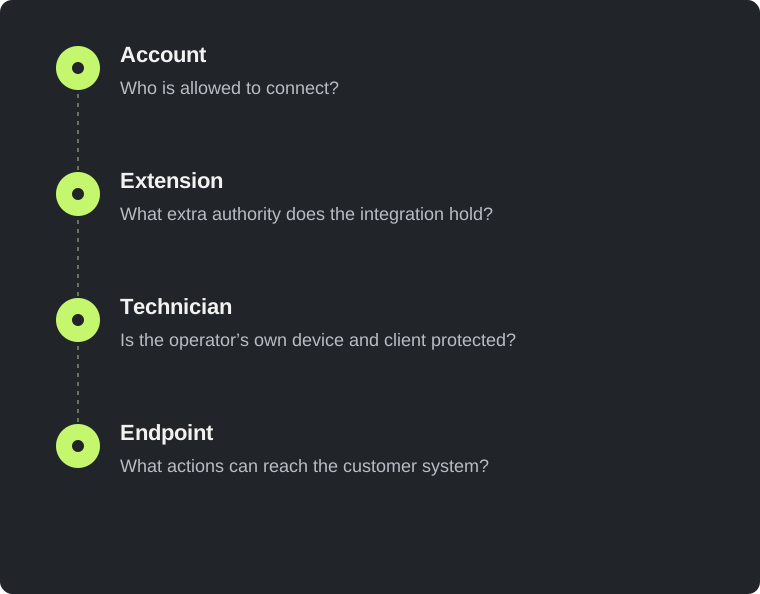
- Account
Who is allowed to connect?
- Extension
What extra authority does the integration hold?
- Technician
Is the operator’s own device and client protected?
- Endpoint
What actions can reach the customer system?
Make privileged access specific and temporary where practical
A useful access record answers four questions: who, to what, for which action and for how long? “Supplier access” is too vague. “Named technician can administer the finance laptop during an approved maintenance window” is a boundary that can be reviewed. Some operational roles genuinely require ongoing access, but that should be a conscious decision with monitoring and periodic review.
CISA’s remote-access guidance emphasizes governance, least privilege, stronger authentication and monitoring. [2] These principles do not eliminate every technical flaw, but they give a business several opportunities to prevent or notice misuse. In practice, they also make normal administration easier to explain because legitimate activity has an owner and a purpose.
Multifactor authentication belongs in that arrangement, but its scope needs to be understood. A human login, an extension API and a saved session may use different mechanisms. Do not assume that enabling MFA on a portal places the same challenge in front of every machine-to-machine operation. Ask how non-interactive access is authorized, where its credentials live and how it is revoked when an integration is removed.
The fictional policy record below is a conversation aid, not configuration for ScreenConnect or any other product. It makes the intended boundary explicit before a technician translates it into product settings. The important output is a verified mapping between the business rule and actual enforcement. A beautifully written access policy that nobody implements offers little help when a real account is misused.
{
  "principal": "named-provider-technician",
  "customer": "example-agency",
  "allowed_devices": ["approved-support-group"],
  "privileged_access": {
    "requires_ticket": true,
    "requires_customer_approval": true,
    "review_after_days": 30
  },
  "unattended_access": false,
  "activity_log_owner": "customer-security-contact",
  "revoke_when": ["contract_ends", "technician_leaves"]
}Treat extensions as software with authority
An extension is often introduced as a convenience: synchronize a ticket, retrieve a password, run a task or connect two tools. Its commercial description may sound modest while its technical permissions are substantial. Review what the extension can execute, which accounts it uses and which information crosses the integration. The risk comes from that authority and exposure, not from whether the feature seems important to the business.
Keep a list of enabled extensions with a business owner and a reason for use. Remove components that no longer serve a purpose through the supplier’s supported process. Before adding one, establish how updates arrive, how security notices are received and who can disable it quickly. A plugin installed by a former contractor should not remain an unexplained part of a privileged management environment.
Separate vendor support from independent development. A component appearing inside a familiar product may have its own developer, release process and security assumptions. Ask who maintains it and which party investigates problems. This is especially relevant when an extension bridges a boundary between ticketing, credentials and remote execution. The connection can make support efficient, but it also joins systems that previously required separate access.
Review stored secrets without copying them into tickets or reports. Record the secret’s purpose, owner, permissions and rotation process rather than the value itself. When a component is removed, confirm whether the credential remains valid elsewhere. Disabling the interface and revoking its authority are different actions. Plan both so a retired integration does not preserve an invisible route into the business.
Make activity understandable before an emergency
A log becomes useful when somebody can connect an action to an authorized purpose. For remote support, useful questions include which technician connected, which endpoint was involved, when the session began, whether a command ran and which support request justified it. Exact fields depend on the tools in use, so verify what is actually recorded rather than assuming the product captures every important action.
Keep the customer’s ability to obtain evidence independent of a single technician. If the provider is unavailable or its account is part of the concern, the business still needs a route to relevant records. Discuss retention, export and access arrangements in advance. Do not fill logs with passwords or unnecessary customer content; the objective is accountability, not creation of another sensitive-data store.
Monitoring should look for deviations from the organization’s normal support pattern. A new administrative account, an unexpected remote tool or a batch of commands without corresponding tickets may justify investigation. None automatically proves malicious activity. A legitimate emergency maintenance task may look unusual, which is why the reviewer needs business context and a reliable way to contact the responsible person.
Test the evidence process with a benign exercise. Arrange a normal support session on a designated test device and ask the provider to show the resulting records. Can the business identify the session and the actions it authorized? How long does it take to obtain the information? This small rehearsal can expose practical gaps that a checklist completed during procurement would never reveal.
If you suspect misuse, preserve a trustworthy recovery route
A suspected remote-support compromise changes which tools you should trust. If the management channel itself may be involved, using it to investigate or clean every endpoint can complicate the response. The business should have an agreed independent route for contacting responders, accessing evidence and making necessary changes. Incident response requires context-specific decisions; a blog post cannot establish that an affected machine is safe.
Begin by identifying the responsible coordinator and recording the timeline of observations. Distinguish facts from assumptions: an unauthorized session is an observation; the belief that a particular supplier account caused it is a hypothesis until evidence supports it. Preserve relevant logs and account details through approved channels. Avoid deleting suspicious software merely to make an alert disappear before evidence has been considered.
Containment may require disabling access, isolating devices, revoking sessions or replacing credentials. The sequence matters because poorly coordinated changes can remove evidence or lock out the people needed for recovery. Work with the organization’s incident-response lead and the vendor’s current guidance. Do not treat a generic cleanup command found online as proof that every access path has been removed.
Recovery should include verification against the intended access model. Confirm which accounts and tools remain, which credentials were replaced and which services are permitted to reconnect. A system returning to normal operation is an availability milestone; it is not, by itself, evidence that the security investigation is complete. Document residual uncertainty so the business can make an informed decision about further review.
Questions your IT provider should be able to answer
Ask the provider for the current list of remote-management products and major integrations used for your environment. Request named accountability for security notices and incident coordination. Establish whether your tenant is hosted or self-managed and who is responsible for each class of update. The objective is an accurate responsibility map, not a debate about which organization can avoid blame.
Next, ask how access changes when technicians join, change role or leave. Can a person who stops supporting your company still reach its devices? Are emergency accounts reviewed after use? How are sessions invalidated when access is removed? These questions should produce a process and evidence, not merely an assurance that staff are trustworthy. Trust and verifiable controls serve different purposes.
Discuss customer separation. A provider serving many businesses should explain how one customer’s permissions and devices are distinguished from another’s. You may not be entitled to inspect other customers’ environments, but you can ask for an explanation of the boundaries protecting your own. For a formal assessment, agree a scope that respects the provider’s authorization and excludes unrelated customers.
Finally, establish the exit process before you need it. Know how management agents are removed, credentials transferred or revoked, recovery contacts changed and records returned. A good service relationship should make transitions orderly. The ability to leave safely is also useful during an incident because it reveals whether the business has retained meaningful control of its infrastructure.
Choose an assessment that matches the actual question
A web application penetration test can investigate a defined portal or API when the owner authorizes that work. It can examine access boundaries, exposed functionality and relevant application behavior. It does not automatically cover every technician laptop, internal endpoint or remote-management deployment belonging to a supplier. Those are separate assets with separate permissions and assessment needs.
For a smaller business, a free external review of one approved domain can establish a useful starting point: what is visible, which observations are supported and where deeper testing may help. If the concern is supplier access or suspected endpoint compromise, the next conversation should identify the right scope rather than force the problem into a website scan. Clear limits make the assessment more credible.
The lasting lesson is that remote support deserves deliberate governance because it exists to make powerful actions easy. Keep that convenience, but make its boundaries visible. Know who can act, what they can reach, how you would notice misuse and how you would recover independently. Those questions remain useful long after the next vendor advisory replaces this one in the news.
Sources & editorial notes
This analysis uses public reporting and the sources below. Confirmed facts are distinguished from our recommendations and hypothetical examples. We did not investigate these organisations’ systems. Code examples are educational and should be adapted and tested in an authorised environment.
- ConnectWise Trust Center: ScreenConnect investigation and partner guidance
Read the ScreenConnect section dated 11–16 November 2026. The separate Cloud Backup/SkyKick incident on this page is not the subject of this article.
- CISA: Guide to Securing Remote Access Software
Background guidance on governing, restricting and monitoring remote access; not evidence about this incident.
Incident accounts can change as investigations develop. This article reflects sources checked on 19 November 2026. Illustrations are conceptual; no affiliation or endorsement is implied.