
What to take away
- A legacy system remains part of your risk until its access, data and dependencies are deliberately retired.
- An inventory becomes useful when every entry has an owner and a decision, not merely a hostname.
- External discovery is a starting point; authenticated testing and retirement verification need their own scope.
A local system, an organization-wide question
On 11 November 2026, Maersk disclosed unauthorized access and data extraction from a local legacy system inherited through an acquisition. Its statement said the incident was isolated, with no indication of impact on other Maersk systems or customer and partner integrations. It did not anticipate disruption to customer operations. The investigation remained ongoing, and the company said its findings strongly suggested no sensitive data had been disclosed. [1]
Those details matter. This was not an announcement that the whole shipping network had stopped. The statement did not identify an exploited vulnerability, describe the authentication setup or establish that the application had been forgotten. “Forgotten systems” is the business lesson we are exploring, not a finding about Maersk’s internal management. Public information supports a narrower conclusion: an inherited system was accessed and data was taken. [1]
For a smaller company, the useful question is immediately recognizable: which applications are still reachable because nobody has made a final decision about them? The answer might be an old ordering portal, an agency-built landing page, a discontinued customer dashboard or a reporting tool that survives because one person still downloads a spreadsheet each month. These systems can remain connected long after the project that created them has ended.
A successful security program does not depend on labeling everything old as dangerous. It depends on knowing what remains in service, why it exists and what access it retains. An application written five years ago with active maintenance and narrow permissions may be better managed than a prototype launched last week. Age is a useful prompt for questions, not a vulnerability by itself.
The business reasons that keep old applications alive
Imagine a hypothetical Philippine ecommerce business buying a smaller competitor. The public storefront moves to a new platform, but the acquired company’s returns portal stays online for customers with older orders. A shipping integration still uses its API. Finance needs historical invoices, and a supplier has bookmarked its administration page. Turning it off immediately would create real problems, so the migration team postpones the decision.
Six months later, the developer who understood the portal has left. The original owner assumes the acquisition team took responsibility; the acquisition team assumes IT did. A cloud invoice continues arriving and an automated certificate renewal keeps the HTTPS connection healthy. The application looks operational, but nobody can confidently explain its permissions or update history. This example is invented, but it illustrates a management gap worth looking for in your own environment.
The same pattern appears without acquisitions. A startup changes product direction and keeps the previous version available for a few customers. A sales team launches a campaign microsite outside the main deployment process. A contractor creates a temporary file-sharing service that becomes indispensable. Each decision may be reasonable at the time. The risk emerges when temporary arrangements stop receiving deliberate attention.
Treat this as an ownership problem before treating it as a tooling problem. A scanner can tell you that a service responds. It cannot decide whether a customer still relies on it, whether a contract requires a record to remain available or who can approve retirement. Those questions need business participation. The technical inventory and the business explanation must meet in the same place.
Build an inventory that leads to decisions
Start with information you already control: domain registrations, DNS zones, cloud accounts, hosting invoices, deployment repositories and password-manager entries. Ask finance which recurring technical bills it pays. Ask customer support which unusual links it still sends. Ask sales which forms collect prospect information. A technical discovery exercise alone may miss services reached through a supplier’s domain or applications that are used only by a small internal team.
For each application, record its purpose, accountable owner, hosting account, data categories, authentication method and important dependencies. Add the date somebody last verified those facts. “Owned by IT” is rarely enough for a small organization where several contractors share duties. Name the person who can make the next decision, even if another person performs the work. Ownership is about accountability, not necessarily server administration.
Then choose an explicit disposition: retain and maintain, restrict while migrating, replace, or retire. Give transitional states an expiry date. A portal marked “temporary” without a review date is a permanent service with weaker documentation. Where the application must stay, define the minimum business function that justifies it. That makes it easier to remove unnecessary administrator accounts, exports and integrations while preserving the capability people actually need.
The example below checks a small local inventory for missing ownership and overdue review dates. It uses fictional domains and makes no network requests. Its output is a list of records needing attention, not a list of vulnerable systems. A real inventory would also need a process for verifying entries and tracking decisions after the script has run.
from datetime import date

assets = [
    {"host": "returns.example.com", "owner": "Operations",
     "review_due": "2026-11-01"},
    {"host": "preview.example.com", "owner": "",
     "review_due": "2026-12-01"},
]

as_of = date(2026, 11, 19)
for asset in assets:
    reasons = []
    if not asset["owner"].strip():
        reasons.append("assign an accountable owner")
    if date.fromisoformat(asset["review_due"]) < as_of:
        reasons.append("complete the scheduled review")
    if reasons:
print(asset["host"], "—", "; ".join(reasons))Turn an unknown application into an owned decision
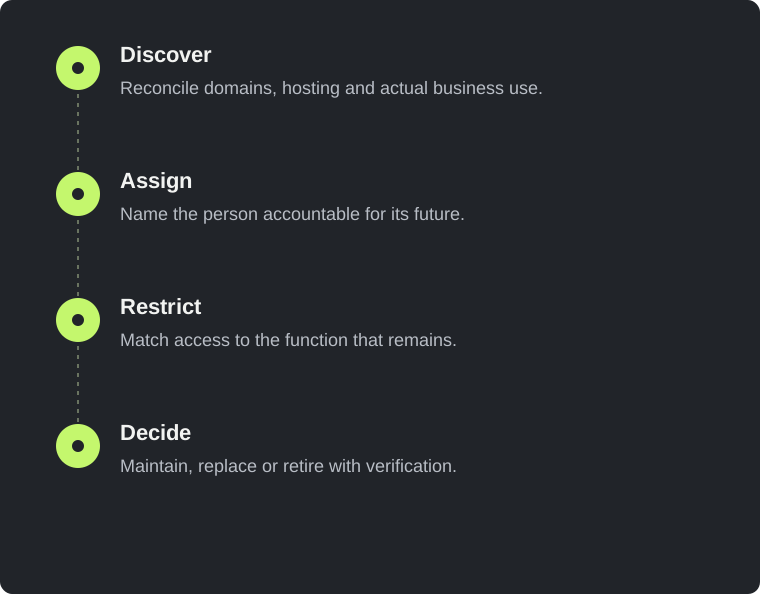
- Discover
Reconcile domains, hosting and actual business use.
- Assign
Name the person accountable for its future.
- Restrict
Match access to the function that remains.
- Decide
Maintain, replace or retire with verification.
Follow the permissions beyond the login page
Once you know an application exists, investigate what it can reach. A small read-only reporting portal may hold a database account with permission to update every customer record. An old integration may use a cloud credential shared with production. A retired employee’s account may still have access because the application is outside the main identity provider. The visible webpage is only one part of the system’s authority.
Map both human and machine access. Human access includes administrators, ordinary users, support staff and contractors. Machine access includes scheduled jobs, webhooks, database connections, deployment identities and API tokens. Record the resource each identity can use and the actions it can perform. “API access” is too broad to assess; “read shipment status for this account” is a boundary somebody can review and test.
Reduce permissions according to the retained purpose of the system. If historical records are the only requirement, consider whether a controlled archive can replace the live application. If one supplier needs an integration, it may be possible to restrict the endpoint and issue a dedicated credential. Avoid sharing a powerful account simply because it is easier to configure. That convenience makes later investigation and revocation harder.
Be careful with apparently simple restrictions. Moving an admin screen to an obscure URL does not establish authorization. Adding a login page does not prove that every API operation checks the caller’s permissions. Restricting browser access does not automatically restrict a background integration. Document the intended boundary, then verify the actual path that users and services follow. The strongest improvement is often a smaller, clearer permission model.
Review the application without creating a new incident
Before testing a legacy application, agree what is owned, which environment can be used and which activities are permitted. The system may have fragile integrations or undocumented jobs. An enthusiastic assessment that overwhelms a neglected service can create the disruption you were trying to prevent. Establish a point of contact, a stop condition and a recovery route before active checks begin.
Start by observing the approved external surface and comparing it with the inventory. Which hostnames answer? Which applications expose a login? Are development interfaces reachable where the owner expected only a public website? These observations can help prioritize deeper work, but they are not proof of compromise. A server header or unfamiliar port needs context before it becomes a reportable security issue.
Authenticated testing should use representative roles and synthetic data wherever possible. For a returns portal, that might mean two customer accounts, a support account and an administrator account in a suitable test environment. The assessment can then examine whether each role is limited to the records and actions the business intended. Testing only an administrator’s happy path says little about the customer boundary.
Include integrations in the scope rather than assuming that the webpage represents the whole application. Exports, callbacks, document downloads and old API versions can preserve access after the main interface changes. Review what happens when an account is disabled, a supplier contract ends or a token is rotated. A useful engagement records the paths tested and the paths excluded so the business understands what the evidence actually covers.
Retirement is a sequence, not a delete button
When the business agrees to retire an application, first identify the records that must remain available and the people authorized to use them. Decide where those records will live and verify that the archive can actually be opened. Keeping a complete live application merely to retain a few documents may preserve unnecessary exposure; deleting everything without checking business obligations can create an entirely different problem.
Next, identify the callers. Access logs, scheduled jobs, integration configurations and conversations with users can reveal dependencies. None is complete on its own. A lack of recent traffic may mean the service is used quarterly, not that it has no purpose. Give affected teams a clear migration date and an alternative. The goal is a controlled transition that makes accidental reactivation less likely.
Remove the service’s authority as well as its public interface. Revoke dedicated tokens, remove unnecessary database users, disable scheduled tasks and close supplier access. Check deployment automation so an old pipeline cannot recreate the application later. Where credentials were shared, plan their replacement carefully instead of breaking unrelated systems. Retirement should leave a record of what was removed and what remains for a specific reason.
Finally, review DNS and externally hosted resources together. A hostname pointing to a deprovisioned third-party service deserves attention; the exact consequence depends on how that provider handles resource ownership. Do not assume that removing the server automatically removes every route associated with it. Verify the final state from the owner’s configuration and the authorized external perspective, and keep evidence of the completed changes.
Make acquisitions and handovers a security checkpoint
A purchase or supplier handover is an opportunity to ask questions that otherwise feel inconvenient. Request a list of applications, administrators, repositories, hosting accounts, renewals, integrations and data stores before responsibility changes. Ask which components were built by subcontractors and whether those subcontractors still have access. A folder of passwords is not a complete technical handover, even when every password works.
Separate business continuity from long-term acceptance. You may need to keep a system running on day one while assessing it over the following weeks. That does not require accepting every inherited permission indefinitely. Give transitional access a documented owner and expiry. Record the assumptions that made the temporary arrangement acceptable so somebody can revisit them when circumstances change.
For a small business, the practical deliverable can be modest: an inventory, an access map, a list of urgent restrictions and a schedule for deeper assessment. You do not need to reproduce the processes of a multinational organization. You do need enough evidence to answer which systems hold customer information, who can administer them and what happens if the original supplier disappears.
The same checkpoint applies when a founder hands a prototype to a development agency or changes hosting providers. Ask for removal of previous access after acceptance, not just creation of new accounts. Make sure the organization controls domain registration and recovery contacts. A technically successful migration can still leave authority scattered among people who no longer have a role.
A useful first week of work
Begin with a bounded business area rather than promising to discover every asset immediately. Choose the customer-facing applications associated with one domain, one acquired brand or one product. Gather the existing records and reconcile conflicting answers. If finance pays for a host nobody recognizes, assign somebody to investigate it. If support relies on a portal absent from the technical inventory, add it with an owner.
Use the next working session to identify the highest-consequence uncertainties. An unknown administrator on a customer database deserves attention before an outdated description field in the inventory. Prioritize systems that expose sensitive data, enable changes to business records or hold credentials for other services. Include uncertainty itself in the priority: an application with unclear ownership and broad access is difficult to defend and difficult to investigate.
Turn each priority into a concrete decision with evidence. “Improve legacy security” is not a useful task. “Confirm the returns portal’s support roles cannot export all customers, using two synthetic accounts in staging” is reviewable. So is “move historical invoices to the approved archive and revoke the portal’s database account after acceptance.” Clear tasks make progress visible and reduce the temptation to treat a scanner score as the whole outcome.
Keep the review alive through normal business events: a new supplier, a product retirement, a contractor departure or a domain renewal. The inventory should change when the organization changes. A short review attached to those moments is more useful than an elaborate spreadsheet that nobody opens until the next incident makes the news.
Where an external review helps—and where it stops
A bounded external review can help a business establish a first picture of the approved domain’s visible exposure. It can document accessible services, observable configuration and questions that deserve closer investigation. That is valuable when the immediate problem is uncertainty about what is publicly reachable. The output should separate evidence from assumptions and identify limitations clearly.
It cannot establish the complete security of an acquired business, inspect every internal permission or prove that an attacker has never entered a system. It also cannot determine all retirement obligations from outside. Those questions require business records, authorized internal access, application testing or incident-response work, depending on the concern. The right next step follows the question you need answered.
For PenTestRaptor, the sensible starting point is one approved domain and the business context behind it. From there, a scoped web or API assessment can examine the specific access boundaries and workflows that matter. The aim is to replace an unowned question with evidence and a decision: maintain this system, restrict it, test it more deeply or retire it properly.
Sources & editorial notes
This analysis uses public reporting and the sources below. Confirmed facts are distinguished from our recommendations and hypothetical examples. We did not investigate these organisations’ systems. Code examples are educational and should be adapted and tested in an authorised environment.
- Maersk: IT security incident, 11 November 2026
Primary company statement. Investigation was ongoing; it did not publish the intrusion method.
Incident accounts can change as investigations develop. This article reflects sources checked on 19 November 2026. Illustrations are conceptual; no affiliation or endorsement is implied.