
What to take away
- Identify the essential business tasks that depend on collaboration tools.
- Prepare an alternative communication route and a protected continuity pack.
- Backups, emergency access and continuity solve different problems.
A day without email is an operations problem
Picture the beginning of a working day. A customer needs a revised proposal, a supplier is waiting for approval and the person who knows the answer cannot open their mailbox. The team tries chat, then checks the calendar, then searches for a document that contains the contact number they need. A familiar productivity platform has become part of the company's operating system, and several apparently separate tasks depend on it.
That is why the business impact of a collaboration outage extends beyond missed messages. Email may carry purchase approvals, password resets, appointment confirmations and the evidence needed to resolve a customer dispute. Calendars coordinate people and shared files hold procedures. Even when some applications remain available, uncertainty about which features work can slow the whole organization.
The November Microsoft 365 outage is a useful opportunity to examine that dependency without treating the platform as uniquely unsafe. Every supplier can fail, and moving to another suite would create a different dependency rather than remove the need to plan. The practical question is what your team must still accomplish during a disruption, which information it needs and how it can operate safely until normal service returns.
What Microsoft’s preliminary report says
Microsoft's preliminary report, dated 15 November 2026, places the main incident between 16:20 UTC on 12 November and 16:10 UTC on 13 November. Exchange Online was especially affected, with mailbox access and email delivery problems; features in other services that depended on Exchange were also disrupted. The report cautions that its findings are preliminary. [1]
It describes a dormant software defect in Microsoft 365 networking gateways, a changed traffic mix and reduced server capacity combining into a cascading failure. The defect had been present for months before these conditions exposed it. Recovery required controlled repair and restoration rather than a simple immediate rollback. This is an operational failure account, not evidence that an attacker caused the outage. [1]
For customers, the useful lesson is broader than the implementation details of a supplier's gateways. A system can operate normally for a long time and still fail when several ordinary conditions coincide. A continuity plan should therefore address the loss of a business capability, such as email or shared documents, rather than assume that the team will correctly predict the exact technical trigger.
Find the work hiding inside the mailbox
Ask each team what it uses email to accomplish, then separate communication from the underlying business process. A finance team may use a message as approval to pay a supplier. Customer support may treat a mailbox as its work queue. Sales may use an email thread as the only record of a negotiated scope. These are different dependencies and need different fallback decisions.
Consider a hypothetical agency serving clients across the Philippines, Malaysia and Singapore. It might be able to postpone an internal planning meeting, but it still needs to acknowledge a live customer incident and avoid missing a time-sensitive delivery. If the relevant contact details, contract notes and escalation procedure are all stored in the same unavailable platform, the team cannot simply switch to the phone. The alternative channel exists, but the information needed to use it does not.
Keep the exercise specific. Identify a small set of essential tasks, their maximum tolerable interruption and the minimum information needed to continue. Do not attempt to duplicate every document and conversation in another system. That creates cost, confusion and additional data exposure. The aim is a deliberate continuity pack for critical work, with named owners and a clear rule for keeping it current.
From interruption to controlled recovery
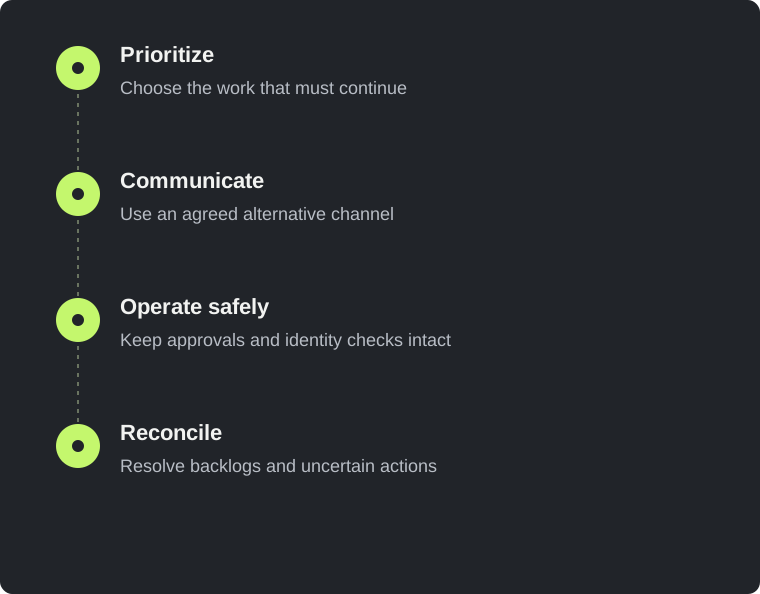
- Prioritize
Choose the work that must continue
- Communicate
Use an agreed alternative channel
- Operate safely
Keep approvals and identity checks intact
- Reconcile
Resolve backlogs and uncertain actions
Choose an alternative channel before everyone improvises
An emergency communication route should be familiar, accessible and appropriate for the information it carries. It may be a separate messaging service, a phone tree or another established channel. The right choice depends on the team and its customers. What matters is that people know when to use it, how to verify identities and where the authoritative incident updates will appear.
Avoid turning an outage into permission to move sensitive information into personal accounts without thought. Customer documents, payroll details and credentials do not become less sensitive because the normal platform is unavailable. Decide which information can be shared through the alternative route and which work should wait. If an exceptional transfer is necessary, give it an owner and a later cleanup or reconciliation step.
Test membership and access in advance. A group created months ago may omit a new employee, include someone who has left or depend on a phone number that has changed. Make sure the communication route does not require the failed platform to reset its password or approve sign-in. The objective is not perfect independence from every conceivable failure, but a documented alternative that survives the specific disruption you are planning for.
Keep a small, protected continuity pack
A useful continuity pack contains the information needed to act, not a wholesale export of the business. It might include an incident contact list, supplier support routes, a short escalation procedure and instructions for finding approved recovery credentials. Keep the credentials themselves in the appropriate secure system rather than embedding them in a portable document. Protect the pack according to the sensitivity of its contents.
Choose owners and a review rhythm. A contact list that is six months out of date can be actively misleading, especially when authority has changed. Include a version date and distinguish the current copy from superseded ones. For a distributed team, confirm that authorized responders can obtain the pack on the devices they actually use, including when normal collaboration services are unavailable.
The local Python check below can help confirm that expected files exist in a chosen continuity directory. It deliberately does not read or print their contents, and it does not verify their accuracy, permissions or usability. Treat it as a small completeness check before a human rehearsal. The meaningful test is whether another authorized team member can use the pack to complete the agreed response steps without asking its author for hidden context.
from pathlib import Path

pack = Path("./continuity-pack")
required = [
    "incident-contacts.pdf",
    "supplier-support-routes.pdf",
    "communication-plan.pdf",
    "recovery-access-instructions.pdf",
]

missing = [name for name in required if not (pack / name).is_file()]
if missing:
    print("Missing continuity documents:")
    for name in missing:
        print(f"- {name}")
else:
    print("Expected files exist. Now verify dates, access and usability.")

# This check does not prove that files are current, readable,
# appropriately protected, or usable during a real outage.Define temporary workflows that preserve controls
When the main platform is unavailable, people will naturally look for ways to keep working. Give them safe options before the pressure arrives. A purchase approval might move to a recorded phone confirmation with a second approver, while nonurgent payments wait. A support team might publish a known alternative contact route and maintain a temporary queue using an approved tool.
The important detail is how those actions return to the normal system. Record the decision, time, people involved and any reference number needed for reconciliation. Decide who will enter the information later and how duplicates will be detected. A temporary process that leaves no trace can solve the immediate communication problem while creating a financial or customer-service problem after the outage ends.
Use explicit limits. Set a maximum value or category for actions allowed through the fallback process, and define exceptions that require escalation. Do not weaken account-verification procedures simply because a customer is frustrated. Attackers can exploit public awareness of an outage to impersonate support staff or request unusual payment changes, so verify unexpected instructions through established contacts. These are general precautions, not a claim that such fraud occurred during this specific incident.
Emergency access helps with lockouts, not every outage
Administrative emergency access is a separate topic from restoring an unavailable service. Microsoft recommends carefully managed emergency access accounts to reduce the risk of administrators being locked out by certain authentication or configuration failures. These accounts are highly privileged and should be restricted, monitored and reserved for genuine emergencies. [2]
Such an account does not make Exchange Online function when the relevant provider infrastructure is unavailable. A plan should distinguish a tenant-specific access problem from a platform outage. Otherwise, the team may waste time changing authentication settings or granting privileges that have no bearing on the actual failure. Those hurried changes can remain after the incident and introduce a new security problem.
Document the circumstances in which emergency access is appropriate, who can authorize its use and how the activity will be reviewed afterward. Rehearse the approved path without making it an everyday convenience. Keep the recovery instructions available to authorized responders and ensure that no single individual's absence makes the procedure impossible. The goal is a controlled recovery capability, not a permanent exception to normal accountability.
A backup and a working business are different outcomes
Backups answer an important question: can information be recovered if the primary copy is lost or damaged? Continuity asks a broader one: can people perform the essential work while a service is unavailable? A backup that requires a lengthy restoration process may protect data well while offering little help during a short collaboration outage. Both functions can be valuable, but they should not be confused.
Evaluate recovery at the level of a useful task. Can an authorized person find the customer agreement needed to resolve a dispute? Can the team access a current contact list? Can it verify which approvals were already completed? The test should include access controls and the risk of restoring information to an unsuitable location. A hurried recovery into an open shared folder can create a confidentiality problem while solving an availability problem.
Also consider the dependencies of the backup service itself. It may rely on the same identity provider or require administrator consent through the platform that is failing. Ask the provider how access and recovery work under the scenarios that matter to you. A successful backup dashboard is evidence of a completed backup job; it is not, by itself, proof that your team can recover the right information within the required time.
Tell customers what changes for them
A customer update should explain the effect on the service they use, rather than repeat a supplier's technical status word for word. If support responses are delayed but the application is operating normally, say that. If new account invitations cannot be delivered, provide the approved next step. Avoid a sweeping statement that everything is down when the impact is limited to one workflow.
Give the next update time even when there is no reliable restoration estimate. This reduces the pressure on customers to repeatedly chase individual staff members. Maintain one authoritative status message and keep frontline teams aligned with it. If the alternative contact route has capacity limits, explain them honestly instead of creating an expectation that every request will receive an immediate answer.
After recovery, communicate any remaining backlog or actions customers need to take. A provider's green status does not mean that your delayed mail, pending approvals and support queue have all been processed. Tell customers how uncertain transactions or missing confirmations will be checked. Clear communication protects trust because it describes the situation the customer is experiencing, including the work that continues after the technical incident is resolved.
Rehearse a working day with one dependency removed
A small tabletop exercise can expose gaps without disrupting production. Choose a scenario in which email is unavailable for a working day and some collaboration features are unreliable. Ask each essential team to walk through its next two hours. The exercise should include a customer escalation, a time-sensitive approval and an administrator who cannot rely on their usual communication channel.
Observe where people stop. They may need a telephone number stored only in a mailbox, an approval policy known only to one manager or a document accessible through the affected sign-in flow. Turn each obstacle into a concrete improvement. Avoid judging the exercise by whether participants guessed the intended answer; judge it by whether the business now has a more usable process.
Repeat the exercise after significant organizational changes. A new office, an outsourced support team or a different finance workflow may introduce dependencies that the old plan never considered. Keep the rehearsal proportionate and focused. Half an hour spent testing one essential process with the people who perform it can be more productive than an annual exercise that asks everyone to discuss a generic disaster.
Start with continuity, then scope security questions precisely
The immediate next step is to choose the essential tasks that must continue during a collaboration outage. Give each task an owner, a tolerable delay, an alternative communication route and a reconciliation rule. Check that the supporting information is available to the people who need it. This is practical continuity work that a business can begin without waiting for a complete redesign of its technology stack.
Security testing can answer related but different questions. It can investigate whether your public application exposes customer information, whether permissions are enforced and whether recovery or administrative endpoints can be abused. It cannot guarantee that a cloud collaboration provider will remain available. A free external review is a bounded starting point for your own domain, not a substitute for testing the company's continuity plan.
The strongest response to this outage is neither panic nor complacency. Keep the tools that serve the business, understand the work that depends on them and practice the alternatives for the tasks that matter most. When the next disruption arrives, your team should spend its first minutes executing a known plan rather than searching an unavailable mailbox for the instructions.
Sources & editorial notes
This analysis uses public reporting and the sources below. Confirmed facts are distinguished from our recommendations and hypothetical examples. We did not investigate these organisations’ systems. Code examples are educational and should be adapted and tested in an authorised environment.
- Microsoft 365 preliminary post-incident report — 15 November 2026
Microsoft-authored preliminary report hosted by ISMG; findings may be superseded. Reviewed 19 November 2026.
- Microsoft Learn — manage emergency access accounts
General access-management guidance, not a remedy for every provider outage.
Incident accounts can change as investigations develop. This article reflects sources checked on 19 November 2026. Illustrations are conceptual; no affiliation or endorsement is implied.